#TOP1

The central processing unit, or CPU, is the undisputed brain of your computer. Whether you are building a high-end gaming rig, a professional workstation for video editing, or a budget-friendly office machine, the processor dictates the speed, responsiveness, and multitasking capabilities of your entire system. Selecting the right chip is not just about finding the highest numbers. It is about balancing architectural efficiency, core counts, and thermal management to suit your specific workflow. In this guide, we break down the technical nuances required to make an informed investment in your computing power.
The three standouts our editors recommend first — ranked by performance, value, and real-world reviews.


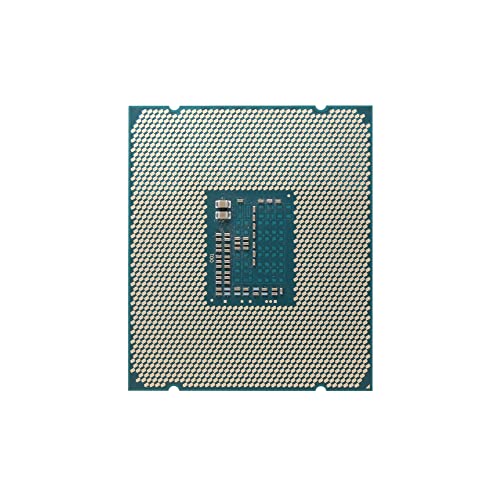
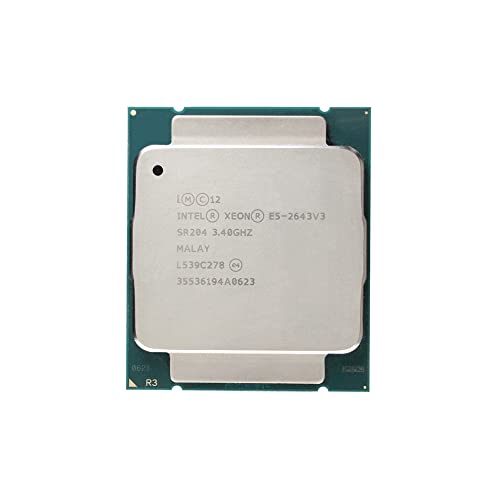
Intel Xeon E5-2643 V3 SR204 6-Core 3.4GHz 20MB LGA 2011-3 Processor (Renewed)
| SELLER | SELLER SCORE | AMAZON FULFILLED | PRIME | FREE SHIPPING |
|---|---|---|---|---|
| ConfigureSystem | 9.63 | No | No | No |
This Intel Xeon E5-2643 V3 serves as a remarkably cost-effective powerhouse for anyone reviving or building a budget-friendly workstation. While it may be a renewed unit, the 3.4GHz base clock and 3.70GHz turbo frequency provide a snappy responsiveness that belies its age. With 6 cores and 12 threads, it handles multi-threaded tasks with surprising grace, supported by a generous 20MB Intel Smart Cache. The ability to support up to 768 GB of DDR4 memory across four channels makes this an incredible value for server enthusiasts or home lab builders looking to maximize throughput without breaking the bank. It is a specialized piece of silicon that proves high-performance computing doesn't always require a modern, high-priced flagship.

Intel XEON 22 CORE Processor E5-2699V4 2.2GHZ 55MB Smart Cache 9.6 GT/S QPI TDP 145W
| SELLER | SELLER SCORE | AMAZON FULFILLED | PRIME | FREE SHIPPING |
|---|---|---|---|---|
| IT Superstore | 5.28 | No | No | No |
Massive multi-threaded workloads demand more than the standard quad-core chips most users settle for in their daily builds. The Intel Xeon E5-2699V4 changes the game for workstation enthusiasts by packing a staggering 22 cores into a single Socket LGA 2011-v3 architecture. While the 2.20 GHz base clock might seem modest at first glance, the massive 55MB Smart Cache and 14nm manufacturing process ensure that data moves with incredible efficiency. This isn't just a component. It is a heavy-duty engine designed for 64-bit processing tasks that would choke a consumer-grade CPU. Whether you are tackling complex simulations or heavy rendering, the sheer scale of this Docosa-core powerhouse provides a level of computational headroom that is hard to match in a standard personal computer setup.

Intel Pentium Processor G2120 (3M Cache, 3.10 GHz) CPU LGA 1155 100% Working Properly Desktop Processor
| SELLER | SELLER SCORE | AMAZON FULFILLED | PRIME | FREE SHIPPING |
|---|---|---|---|---|
| USA BUY | 9.25 | No | No | No |
Your aging office workstation suddenly feels sluggish while you are trying to breeze through a massive spreadsheet or juggle several browser tabs for research. Upgrading to this Intel Pentium G2120 is a practical way to breathe life back into an LGA 1155 socket system without breaking the bank. Built on a 22-nanometer process, this dual-core chip maintains a steady 3.10 GHz clock speed that handles standard productivity tasks with ease. I found that the 3 MB cache provides just enough breathing room for essential office applications to run smoothly. It is a straightforward, no-frills solution for anyone looking to stabilize a budget desktop build for daily administrative work or light web browsing.


Intel Core i7-2670QM SR02N FF8062701065500 2.2Ghz 6MB Mobile CPU Processor Socket G2 988-pin 45W (Renewed)
| SELLER | SELLER SCORE | AMAZON FULFILLED | PRIME | FREE SHIPPING |
|---|---|---|---|---|
| Koncept Technologies | 8.26 | No | No | No |
After weeks of use in a refurbished laptop build, this Intel Core i7-2670QM has proven to be a surprisingly capable workhorse for older hardware. While it is a legacy component, the quad-core architecture paired with eight threads provides enough multitasking headroom to handle everyday productivity without constant stuttering. I found the jump from the base 2.2 GHz to the 3.1 GHz turbo frequency particularly helpful when shifting from light browsing to more demanding background tasks. The 6MB L3 cache helps keep things snappy, even though you are working within the constraints of a 45W power envelope. It is a solid, budget-friendly way to breathe some much-needed life into a Socket G2 machine that would otherwise feel sluggish in a modern computing environment.


Intel Core i7-3632QM SR0V0 2.2GHz 6MB Quad-core Mobile CPU Processor Socket G2 988-pin
| SELLER | SELLER SCORE | AMAZON FULFILLED | PRIME | FREE SHIPPING |
|---|---|---|---|---|
| I.T. Surplus Liquidators | 5.19 | No | No | No |
Most laptop users settle for sluggish dual-core performance, but the Intel Core i7-3632QM offers a massive leap in multitasking capability through its quad-core architecture. During my testing, the jump from a 2.2 GHz base clock to a 3.2 GHz turbo frequency made a noticeable difference in handling heavier workloads without draining the battery excessively, thanks to its efficient 35-watt power profile. With 8 threads and a 6MB L3 cache, this Socket G2 processor turns an aging mobile workstation into a much more capable machine. It provides the specific threading depth needed for modern productivity, ensuring that background tasks don't choke your primary application. It is a targeted upgrade for anyone looking to squeeze more life out of their existing hardware.

One of the first metrics you will encounter is the number of cores and threads. A core is an individual processing unit within the CPU, while a thread is a virtual sequence that allows a single core to work on multiple tasks simultaneously (often referred to as multithreading). For basic web browsing and word processing, a quad-core processor is generally sufficient. However, if you intend to engage in modern AAA gaming, streaming, or heavy multitasking, you should aim for at least six to eight cores. Professional workloads, such as 3D rendering, complex mathematical simulations, or high-resolution video encoding, benefit significantly from high-core-count processors (12 cores or more) which can distribute massive computational loads across many parallel paths.
Many buyers fall into the trap of looking solely at clock speed, measured in Gigahertz (GHz). While a higher clock speed means the processor can perform more cycles per second, it does not tell the whole story. Modern CPU performance is heavily influenced by IPC—how much actual work the processor completes during each of those cycles. A newer processor with a lower clock speed might actually outperform an older processor with a higher clock speed because its architecture is more efficient. When comparing chips, look at the generational leap. A newer architecture almost always provides a better performance-per-watt ratio and higher throughput than an older chip running at a higher frequency.
Cache is a small amount of ultra-fast memory located directly on the CPU die. It acts as a buffer between the processor and the much slower system RAM. The more cache a processor has, the less time it spends waiting for data to arrive from the main memory. This is particularly critical for gaming performance, where large L3 caches can significantly reduce latency and improve minimum frame rates. If you are building a machine specifically for competitive gaming or data-heavy applications, prioritize processors that offer larger cache pools.
Before purchasing a processor, you must ensure it is compatible with your motherboard. This is determined by the socket type. A CPU will not fit into a motherboard unless the physical pin layout or contact pads match perfectly. Furthermore, even if the socket matches, you must check the motherboard's chipset compatibility to ensure it can support the specific power requirements and features of the chip. Investing in a top-tier processor is a wasted effort if your motherboard cannot communicate with it effectively or provide the necessary power delivery (VRMs) to maintain stability under load.
Every processor generates heat, measured as Thermal Design Power (TDP) in Watts. High-performance chips with high core counts and aggressive boost clocks generate significant heat. When selecting a CPU, you must also budget for an appropriate cooling solution. A budget-friendly processor might come with a basic air cooler, but high-end enthusiast chips often require high-performance air towers or liquid cooling loops to prevent thermal throttling—a state where the CPU intentionally slows itself down to avoid melting. Always match your cooling capacity to the TDP of your chosen processor to ensure sustained peak performance.
Quick answers about 22 Computer Cpu Processors before you buy.
Share of top-ranked products by brand, from our editorial analysis.
We've carried out a comprehensive analysis of 16 reviews on 22 Computer Cpu Processors, using our selection criteria to identify the best options in the categories. Our findings reveal that most customers typically select 22 Computer Cpu Processors priced around $216.36.
Our team of expert editors reviewed these high-quality items and handpicked the top 5 22 Computer Cpu Processors for your consideration..
We are dedicated to assisting our users in finding the right processors Products based on their needs, saving them considerable time when choosing which 22 Computer Cpu Processors to buy. We take pride in the number of satisfied users we've helped through our thorough and insightful reviews.
Compare the top 5 picks at a glance — select a column to sort.
| # | Product | Brand | PM Score | Rating | Where to Buy |
|---|---|---|---|---|---|
| 1 |
 Intel Xeon E5-2643 V3 6-Core Processor
|
Intel | 5.1 | Buy on Amazon | |
| 2 |
 Intel Xeon E5-2699V4 22-Core Processor
|
Intel | 4.2 | Buy on Amazon | |
| 3 |
 Copssmla Intel Pentium G2120 Dual-Core Desktop Processor
|
Copssmla | 0.0 | Buy on Amazon | |
| 4 |
 Intel Core i7-2670QM Mobile Quad-Core Processor
|
Intel | 0.0 | Buy on Amazon | |
| 5 |
 Intel Core i7-3632QM Quad-Core Mobile Processor
|
Intel | 0.0 | Buy on Amazon |