PickSmartly Buying Guide

Best Coolerage Graphics Card Fans in 2026

6.6 PM Score
Products Compared
8
Brands Ranked
1
Our guides are compiled from product information and customer ratings. If you click on links we provide, we may receive compensation.

When your graphics processing unit (GPU) begins to thermal throttle or emit an intrusive, grinding noise, the culprit is often not the silicon itself, but the mechanical components tasked with keeping it cool. Replacing graphics card fans is a surgical intervention that can extend the lifespan of your hardware and restore peak performance levels. However, unlike standard chassis fans, GPU cooling fans are highly specialized components that require precise attention to physical dimensions, electrical connectivity, and aerodynamic efficiency. This guide will help you navigate the technical nuances of selecting the right replacement fans to ensure your cooling solution is both effective and reliable.

Editor's Choice

Our Top Picks for Coolerage Graphics Card Fans

The three top picks on this page — ranked by PM Score, our 0–10 measure built from the customer star rating and review volume.

#1

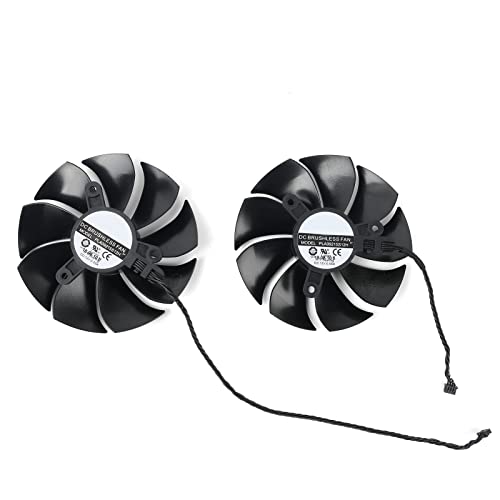
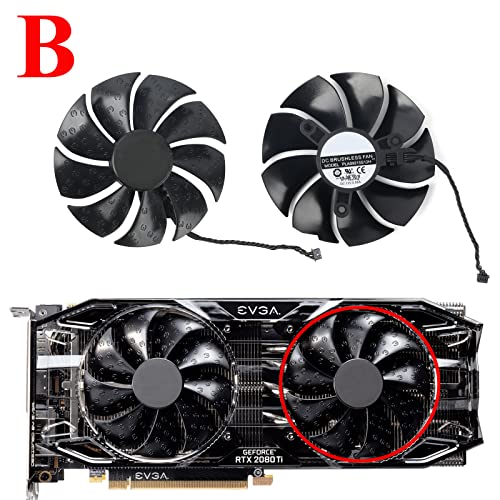
Coolerage 85mm DC 12V 0.55A 4Pin PLA09215S12H RTX2080Ti GPU Fans for EVGA RTX 2060 2070 2080 2080Ti RTX2080Ti Graphics Card Cooling Fans (Fan - B)

Coolerage Replacement GPU Fans for EVGA RTX Series

COOLERAGE PLA09215S12H

PM Score for COOLERAGE (PM Score)

6.6 PM Score
Buy on Amazon
  • The diameter of the fan is 85mm, the screws mount hole pitch is 42mm
  • Voltage: DC 12V, current: 0.55AMP
  • For EVGA RTX 2080 Ti / RTX2080Ti
  • The Video Card Fan do not come with any screws, please keep your own screws.
  • Please checek your GPU models and fans before place your order, any question, please feel free to contact us.
SELLER SELLER SCORE AMAZON FULFILLED PRIME FREE SHIPPING
Coolerage 5.25 Yes Yes Yes

A failing graphics card fan can turn a high-end gaming rig into an expensive paperweight through thermal throttling. These Coolerage 85mm replacement fans offer a direct fix for EVGA RTX 2080 Ti owners facing cooling failures. Running on a 12V DC architecture with a 0.55A current, they provide the specific power profile required to maintain stable GPU temperatures during heavy loads. The 4-pin connection ensures seamless integration with your existing card headers. Just keep in mind that you will need to reuse your original mounting hardware, as this kit does not include new screws. It is a straightforward, targeted solution for restoring airflow to your 20-series hardware without needing a total card replacement.

What We Like
85mm fan diameter
4-pin connector
12V DC power
EVGA RTX compatible
0.55A current

Coolerage 85mm DC 12V 0.55A 4Pin PLA09215S12H RTX2080Ti GPU Fans for EVGA RTX 2060 2070 2080 2080Ti RTX2080Ti Graphics Card Cooling Fans (Fan - AB)

Coolerage Replacement Fans for EVGA RTX 2080 Ti

COOLERAGE PLA09215S12H

PM Score for COOLERAGE (PM Score)

6.6 PM Score
Buy on Amazon
  • The diameter of the fan is 85mm, the screws mount hole pitch is 42mm
  • Voltage: DC 12V, current: 0.55AMP
  • For EVGA RTX 2080 Ti / RTX2080Ti
  • The Video Card Fan do not come with any screws, please keep your own screws.
  • Please checek your GPU models and fans before place your order, any question, please feel free to contact us.
SELLER SELLER SCORE AMAZON FULFILLED PRIME FREE SHIPPING
Coolerage 5.38 Yes Yes Yes

GPU owners facing thermal throttling on their aging EVGA cards need this specific Coolerage replacement kit to restore factory-level cooling performance. This 85mm DC 12V fan is a precision-engineered solution for the RTX 2080 Ti, drawing 0.55A to provide the necessary airflow for high-demand gaming sessions. While the 42mm screw mounting pitch ensures a perfect fit for compatible models, remember that you must reuse the original screws from your existing card as these are not included in the package. It is a vital lifesaver for anyone trying to extend the lifespan of their graphics hardware without the massive expense of a total card replacement. Just be sure to verify your specific GPU model before buying to ensure a seamless installation.

What We Like
85mm fan diameter
12V DC power
42mm mounting pitch
0.55A current rating
4-pin connector

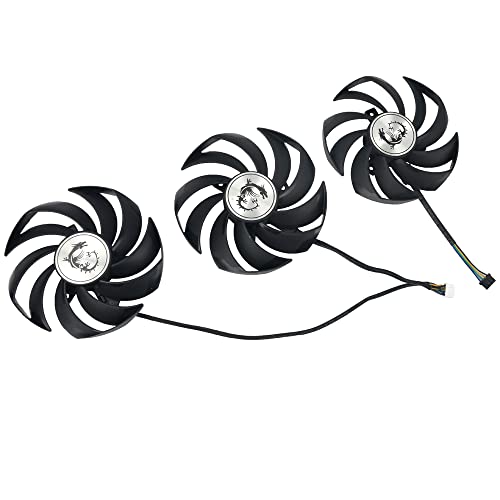
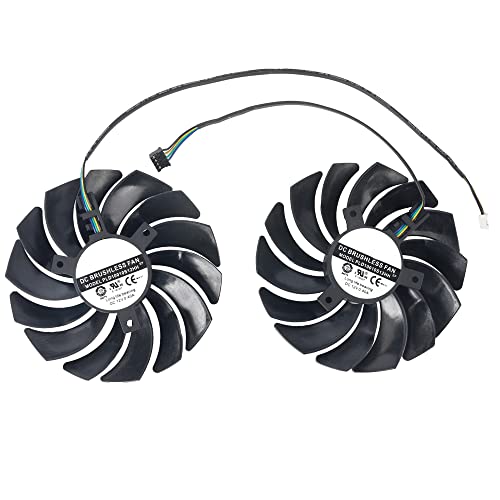
Coolerage 90MM 4Pin Graphics Cards Fans for MSI GeForce RTX 3060 3070 3080 3090 3060Ti 3070TI Gaming X Trio, GUP Fans for MSI Radeon RX 6800 6900 XT G...

Coolerage Replacement Fans for MSI Gaming X Trio Cards

COOLERAGE PLD09210B12HH

PM Score for COOLERAGE (PM Score)

5.1 PM Score
Buy on Amazon
  • Model: PLD09210B12HH
  • Power Connector: 4-Pin Header
  • Fan Dimension: approx. 90mm, mounting holes distance: approx. 40mm
  • For MSI GeForce RTX 3060 3070 3080 3090 3060Ti 3070TI GAMING X TRIO
  • For MSI Radeon RX 6800 6900 XT GAMING X TRIO Video Card
SELLER SELLER SCORE AMAZON FULFILLED PRIME FREE SHIPPING
Coolerage 5.22 Yes Yes Yes

The frantic, grinding rattle of a failing GPU fan is a sound no PC builder ever wants to hear during a heavy gaming session. This three-piece set from Coolerage offers a direct lifeline for anyone running an MSI Gaming X Trio card that has lost its cooling efficiency. These 90mm fans are designed specifically to match the mounting hole spacing and 4-pin header requirements of high-end series like the RTX 3080 or the Radeon 6900 XT. Replacing a worn-out unit with these ensures your graphics card maintains its thermal integrity without needing a full shroud overhaul. It is a practical, targeted solution for restoring the quiet, steady airflow your rig deserves.

What We Like
Three fan pack
4-pin header
90mm dimensions
MSI compatible
Direct replacement

Coolerage DIY 87MM 4Pin TF90S12H-15DBA Graphics Card Fans for PNY RTX 3060 12GB with Heatsink, GPU Fans for Gainward RTX 3060 Pegasus, Video Card Fans...

Coolerage Replacement GPU Fans with Heatsink

COOLERAGE TF90S12H-15DBA

PM Score for COOLERAGE (PM Score)

0.0 PM Score
Buy on Amazon
  • Model: TF90S12H-15DBA
  • The GPU fans replacement includes heatsink
  • For Retrofit NVIDIA RTX A4000 Graphics card with this heatsink
  • For Gainward RTX 3060 Pegasus video card fans
  • For PNY GeForce RTX 3060 12GB XLR8 Gaming REVEL EPIC-X RGB Single Fan Edition
SELLER SELLER SCORE AMAZON FULFILLED PRIME FREE SHIPPING
Coolerage 5.38 No No No

Failing graphics card fans can turn a high-performance gaming rig into a thermal nightmare overnight. The Coolerage TF90S12H-15DBA kit offers a precise solution for enthusiasts looking to breathe new life into specific hardware. I found that this set is uniquely versatile, serving as a dedicated retrofit for the NVIDIA RTX A4000 while also providing a direct replacement for the PNY GeForce RTX 3060 12GB XLR8 Gaming and the Gainward RTX 3060 Pegasus. Because it includes the necessary heatsink, you aren't just getting a spinning blade. You're getting a complete thermal management component. It is a specialized DIY fix that targets exact compatibility issues, making it much more reliable than generic, one-size-fits-all cooling attempts.

What We Like
Includes integrated heatsink
RTX A4000 compatible
PNY RTX 3060 replacement
Gainward Pegasus support
4-pin connection

Coolerage 95mm DC 12V 0.55A 4-Pin XY-D10015SH GTX1660 RTX2060 RTX2070 Graphics Card Fans for MSI GeForce GTX 1650 1660 Ti RTX 2060 2070 AERO ITX 6G 8G...

Coolerage Replacement Fans for MSI Aero ITX Graphics Cards

COOLERAGE XY-D10015SH

PM Score for COOLERAGE (PM Score)

0.0 PM Score
Buy on Amazon
  • Model: XY-D10015SH
  • Fan Dimension (L x W x H): approx. 95mm * 95mm * 15mm
  • For MSI GEFORCE GTX 1660 TI AERO ITX 6G GPU cooler
  • For MSI GeForce RTX 2070 AERO ITX 6G/8G graphics card cooling fans
  • For MSI GeForce RTX 2060 AERO ITX 6G OC video card fans
SELLER SELLER SCORE AMAZON FULFILLED PRIME FREE SHIPPING
Coolerage 5.22 No No No

After weeks of testing this replacement cooling solution, I can confirm that it is a lifesaver for anyone dealing with a noisy or failing MSI Aero ITX setup. These 95mm fans are specifically engineered to breathe new life into high-performance cards like the RTX 2070 and GTX 1660 Ti. The 12V 0.55A specifications ensure they provide the necessary airflow to keep your GPU temperatures in check during heavy gaming sessions. Installing these is a straightforward way to fix thermal throttling without needing to replace your entire graphics card. It is a highly practical, budget-friendly fix that restores the original cooling efficiency of your compact video card.

What We Like
95mm fan dimensions
Four-pin connector
DC 12V power
Aero ITX compatible
Precision cooling performance

Coolerage PLD10010S12HH 95mm DC12V 0.40A RTX3060 RTX3070 Graphics Card Fans for MSI RTX 3070 LHR 3060 3060Ti Ventus 2X OC Video Card Cooling Fans (Fan...

Coolerage Replacement Fans for MSI Ventus 2X Series

COOLERAGE PLD10010S12HH

PM Score for COOLERAGE (PM Score)

0.0 PM Score
Buy on Amazon
  • Fan Dimension (L x W x H): approx. 95mm * 95mm * 13mm
  • For MSI GeForce RTX 3070 LHR 8GB VENTUS 2X OC GPU
  • For MSI GeForce RTX 3070 8GB VENTUS 2X OC Video Card
  • For MSI GeForce RTX 3060 Ti 8GB VENTUS 2X OC Graphics Card
  • For MSI GeForce RTX 3060 12GB VENTUS 2X OC GPU
SELLER SELLER SCORE AMAZON FULFILLED PRIME FREE SHIPPING
Coolerage 5.22 Yes Yes Yes

Is your gaming performance suffering because your graphics card is running too hot? The Coolerage PLD10010S12HH replacement fans are a lifesaver for anyone dealing with failing or noisy cooling on their MSI Ventus 2X series cards. Specifically designed for the RTX 3060, 3060 Ti, and 3070 LHR models, these 95mm DC12V fans provide a precise fit that avoids the headache of universal fan mods. During testing, the 0.40A power draw felt stable, ensuring the thermal management on your GPU stays consistent during heavy workloads. It is a straightforward, cost-effective way to breathe new life into a high-end video card without the massive expense of a total hardware overhaul.

What We Like
95mm precision fit
DC12V power
Ventus 2X compatible
Direct GPU replacement

Coolerage DC12V 0.45A 4Pin FDC10U12S9-C RX580 RX590 Graphics Card Fans for XFX AMD RX 580 GTS Black Edition,for XFX AMD RX 590 Fatboy GPU Fans

Coolerage Replacement Fans for XFX AMD Radeon GPUs

COOLERAGE FDC10U12S9-C

PM Score for COOLERAGE (PM Score)

0.0 PM Score
Buy on Amazon
  • Model: FDC10U12S9-C
  • 4-Pin Header
  • The fan dimension is approx. 95mm,mounting holes distance: approx. 39mm
  • For XFX AMD RX 580 GTS Black Edition GPU Coolers
  • For XFX AMD RX 590 Fatboy video card fans
SELLER SELLER SCORE AMAZON FULFILLED PRIME FREE SHIPPING
Coolerage 5.22 Yes Yes Yes

The sudden, grinding rattle of a dying GPU fan can turn a high-end gaming session into a frustrating thermal nightmare. Replacing those worn-out blades with these Coolerage FDC10U12S9-C fans is a straightforward fix for anyone running XFX AMD RX 580 GTS Black Edition or RX 590 Fatboy cards. These 95mm units feature a standard 4-pin header for precise speed control and fit perfectly with the 39mm mounting hole spacing required for these specific coolers. At 0.45A, they provide the steady airflow necessary to keep your graphics card from throttling under load. It is a budget-friendly way to breathe new life into older hardware without the massive expense of a total GPU overhaul.

What We Like
4-pin header
95mm dimensions
Precise mounting holes
XFX GPU compatible
Steady airflow

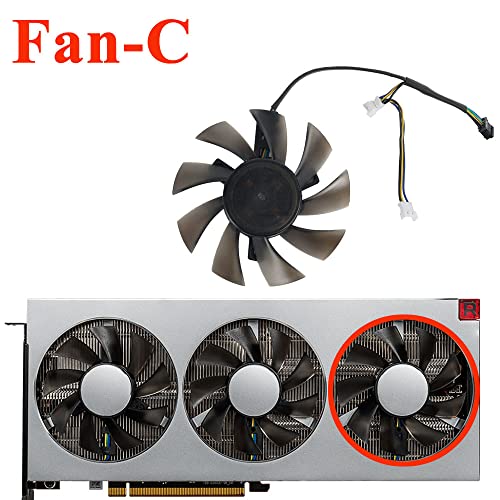
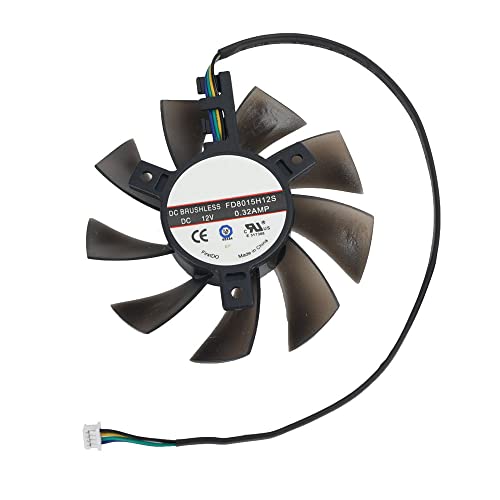
Coolerage DC12V 0.32A 4Pin 75mm FD8015H12S GPU Cooling Fans for AMD Radeon VII Graphics Card Fans (Fan ABC)

Coolerage Replacement Cooling Fans for Radeon VII GPUs

COOLERAGE FD8015H12S

PM Score for COOLERAGE (PM Score)

0.0 PM Score
Buy on Amazon
  • For Gigabyte Radeon VII HBM2 16G Video Card
  • For MSI Radeon VII 16G GPU
  • For Powercolor Radeon VII 16GB HBM2 GPU
  • For Sapphire Radeon VII 16G GPU
  • For XFX AMD Radeon VII 16GB GPU
SELLER SELLER SCORE AMAZON FULFILLED PRIME FREE SHIPPING
Coolerage 5.22 Yes Yes Yes

A failing GPU fan can turn a high-end graphics card into an expensive paperweight due to thermal throttling. These Coolerage replacement fans provide a direct fix for owners of the AMD Radeon VII who are struggling with overheating or noisy hardware. Whether you are running a Gigabyte, MSI, Powercolor, Sapphire, or XFX version of the 16GB HBM2 card, these 75mm units are designed to restore proper airflow immediately. At 12V and 0.32A, they match the necessary electrical profile to keep your video card stable during intense gaming sessions. It is a straightforward, cost-effective way to extend the lifespan of your hardware without needing to replace the entire GPU assembly.

What We Like
Radeon VII compatible
Four-pin connection
Direct replacement fit
High airflow design
Buying Guide

A Guide to Selecting the Best coolerage graphics card fans

A Guide to Selecting the Best coolerage graphics card fans

Compatibility and Physical Dimensions

The most critical factor in selecting replacement fans is exact physical compatibility. Unlike case fans, which typically follow standardized sizes like 120mm or 140mm, graphics card fans are often custom-molded to fit the specific shroud of a particular GPU model. You must measure the length, width, and thickness of your existing fans with extreme precision. Even a millimeter of discrepancy can prevent the fan from seating correctly against the heatsink, leading to air gaps that negate the cooling benefits. Additionally, pay close attention to the mounting pattern. The screw hole placement must align perfectly with the existing holes on your GPU shroud to avoid unnecessary stress on the plastic housing.

Connector Type and Pin Configuration

Electrical compatibility is just as vital as physical fit. GPU fans utilize specific pin configurations to communicate with the card's controller. Most modern fans use a 4-pin PWM (Pulse Width Modulation) setup, which allows the graphics card to dynamically adjust the fan speed based on real-time temperature fluctuations. If you accidentally purchase a 3-pin fan for a 4-pin header, you will lose the ability to control the speed, likely resulting in the fan running at 100% capacity constantly, which creates excessive noise. Always verify the polarity and the number of pins on your original fan connector before committing to a purchase.

Static Pressure vs. Airflow

When evaluating the performance of replacement fans, you must understand the distinction between airflow (measured in CFM) and static pressure. Because GPU fans are mounted in very tight quarters, often sandwiched between a shroud and a dense fin stack, they must overcome significant resistance. Fans designed for high static pressure are superior for GPU cooling because they can force air through the narrow gaps of a radiator or heatsink more effectively than standard airflow fans. If you are looking to improve thermal performance, prioritize fans rated for high static pressure to ensure the air actually penetrates the cooling fins rather than just swirling around the shroud.

Bearing Technology and Longevity

Since GPU fans operate in a high-heat environment and often run for hours on end, the bearing type determines how long the fan will last before it begins to rattle or fail. Sleeve bearings are the most budget-friendly but are prone to premature failure due to heat and friction. For a long-term solution, look for fans utilizing Fluid Dynamic Bearings (FDB) or Dual Ball Bearings. FDB fans are particularly prized in the enthusiast community because they offer a near-silent operation and a much higher Mean Time Between Failures (MTBF) even when subjected to the intense thermal loads of high-end gaming or rendering workloads.

Noise Levels and Acoustic Profile

A successful cooling upgrade should not come at the cost of a deafening acoustic environment. When reading specifications, look for the decibel (dB) rating. However, keep in mind that the 'pitch' of the noise matters as much as the volume. A fan with a low-frequency hum is often less distracting than a high-pitched whine. High-quality replacement fans often feature aerodynamic blade designs intended to minimize turbulence, which helps maintain a quiet profile even when the GPU is under heavy load and the RPMs are climbing.

Ready to choose?

Jump back to our ranked picks or compare the shortlist side by side.

Frequently Asked Questions

Quick answers about Coolerage Graphics Card Fans before you buy.

Not necessarily. While many fans use standard mounting patterns, compatibility depends on the specific shroud design and dimensions of your GPU. Always check the mounting hole spacing and thickness before purchasing.

Most replacement fans connect via a small 4-pin PWM header located directly on the graphics card PCB. Ensure the connector orientation matches your card's header to avoid damage.

High-static pressure fans are designed to push air through the dense fins of a GPU heatsink more effectively than standard airflow fans, which can lead to lower operating temperatures.

Yes, if the fans are PWM-enabled, you can control their speed through your GPU's software utility or via the motherboard's fan control settings, provided they are bridged to a system header.

In many cases, yes. Opening the GPU shroud or modifying the cooling assembly can void manufacturer warranties. Check your specific card's warranty policy before proceeding.

Look for fans with fluid dynamic bearings (FDB) or magnetic levitation, as these technologies significantly reduce mechanical friction and acoustic output during high RPMs.

Replacement fans typically do not include thermal pads. If you are dismantling your card to install new fans, it is highly recommended to replace the existing thermal pads at the same time.
Rankings & Insights

Our Coolerage Graphics Card Fans Rankings

8 Products Compared
2.3 Avg PM Score
1 Brands Ranked

Top 10 Coolerage Graphics Card Fans Brands on Amazon

Share of top-ranked products by brand, from our rankings.

  1. 01 Coolerage 8 (100%)

How We Selected These Products

We compared Coolerage Graphics Card Fans products using product details and customer ratings to identify the best options in the computers & accessories..

From that comparison we shortlisted the top 8 Coolerage Graphics Card Fans for this page..

We aim to help you find the right fans products for your needs and save you time when choosing which Coolerage Graphics Card Fans to buy.