Material Composition and Durability
The most critical factor when selecting laptop decals is the material. You should prioritize high-quality vinyl over paper-based stickers. Paper stickers absorb oils from your skin and moisture from the air, causing them to fray, fade, or tear. High-grade vinyl is waterproof, UV-resistant, and flexible enough to contour to the slight curves of a laptop lid or palm rest. When browsing, look for descriptions mentioning 'premium vinyl' or 'laminated finishes.' A laminated surface provides an extra layer of protection against scratches from being slid in and out of backpacks or sleeves, ensuring the print remains vibrant even after months of handling.
Adhesive Quality and Residue Management
A common fear when decorating expensive hardware is the 'cleanup nightmare.' You want a decal with a strong enough adhesive to stay put during daily transit, but one that utilizes 'removable adhesive' technology. Avoid cheap, generic adhesives that use low-grade glue. These are notorious for leaving a tacky, permanent mess when you eventually decide to change your look. The ideal decal uses a pressure-sensitive adhesive that grips the surface firmly but releases cleanly without the need for harsh chemical solvents that could damage your laptop's finish.
Design Style and Aesthetic Cohesion
Decals generally fall into two categories: individual accent pieces or themed collections. If you are aiming for a 'sticker bomb' look—where the entire surface is covered—you should look for sets that offer a variety of shapes and sizes to minimize awkward gaps. If you prefer a minimalist approach, look for high-definition die-cut decals that follow the specific silhouette of the graphic. Die-cut decals are superior to rectangular stickers because they lack a white border, allowing the art to blend seamlessly into the laptop's color, creating a more professional and integrated appearance.
Size and Placement Considerations
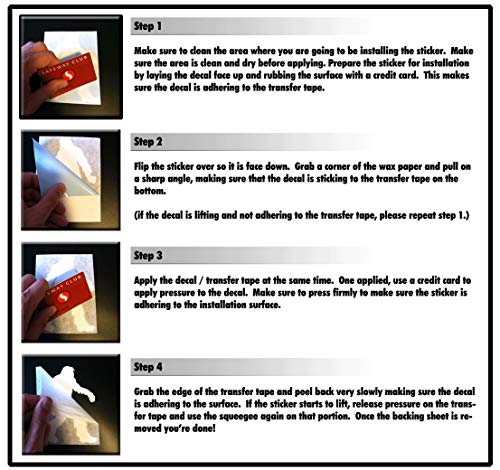
Before committing to a purchase, consider the real estate available on your device. A decal that is too large may interfere with the lid's ability to close properly or overlap with cooling vents, which can lead to overheating. Conversely, tiny decals can get lost in the visual noise. Always check the dimensions provided in the product descriptions. For the best results, plan your layout on a flat surface before applying. If you are applying decals to a textured surface (like some magnesium alloy laptops), be aware that the adhesive may not bond as strongly as it would on a smooth aluminum chassis.
Summary Checklist
When making your final decision, run through this quick mental checklist: Is it made of durable vinyl? Does it feature a protective laminate? Is the adhesive rated as removable? Does the shape (die-cut vs. kiss-cut) match your intended aesthetic? By focusing on these technical specifications rather than just the artwork, you ensure that your laptop stays looking sharp for the long haul.