#TOP1

When you find yourself with a surplus of internal storage drives—whether they are salvaged from an old laptop, upgraded from a desktop, or purchased as standalone units—you need a reliable way to interface them with your modern computing setup. Dy-tech hard drive enclosures serve as the bridge between raw magnetic or flash storage and your USB ports. Unlike simple cables, a high-quality enclosure provides more than just connectivity. It offers structural protection, thermal management, and stable power delivery to ensure your data remains intact during long file transfers. Choosing the right enclosure is a balance between drive compatibility, transfer speeds, and the physical durability required for your specific workflow.
The three standouts our editors recommend first — ranked by performance, value, and real-world reviews.

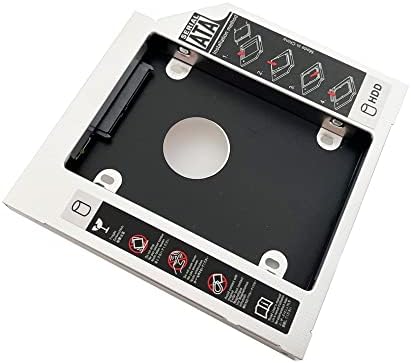


DY-tech 2nd Hard Drive HDD SSD Caddy for iMac 20 21.5 27 inch 2009 2010 2011 Early Late
| SELLER | SELLER SCORE | AMAZON FULFILLED | PRIME | FREE SHIPPING |
|---|---|---|---|---|
| parts-for-Home | 9.86 | Yes | Yes | Yes |
Most iMac owners settle for limited storage or expensive external drives when they could simply repurpose their unused optical drive. The DY-tech Caddy Frame Adapter transforms your aging 2009 through 2011 iMac into a high-capacity workstation by allowing you to swap the internal disc drive for a secondary SATA SSD or HDD. It is a universal 12.7mm height solution that accommodates various drive thicknesses, including 7mm and 9.5mm models. Just keep in mind that this isn't a simple plug-and-play installation. You will need to carefully migrate your original optical drive's faceplate and mounting bracket onto the caddy to ensure a seamless aesthetic match with your machine. For a low-cost upgrade, it provides a clever way to breathe new life into older hardware.


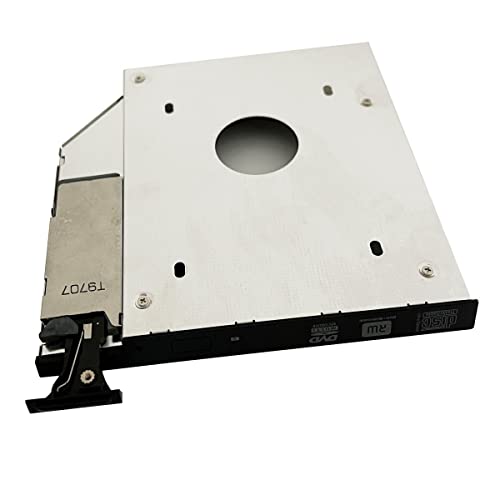


DY-tech 2.5" 9.5mm SATA 2nd HDD SSD Hard Drive Caddy Adapter for DELL Latitude E6400 E6500 E6410 E6510. DELL Precision M2400 M4400 M4500
| SELLER | SELLER SCORE | AMAZON FULFILLED | PRIME | FREE SHIPPING |
|---|---|---|---|---|
| parts-for-Home | 9.86 | No | No | No |
Owners of aging Dell Latitude or Precision machines desperately need this caddy to breathe new life into their hardware. Instead of being stuck with limited storage, you can swap out your rarely used optical drive for a high-capacity SSD or secondary hard drive. The DY-tech adapter is specifically engineered for the E6400, E6500, E6410, E6510, and M-series Precision models, ensuring a precise fit. I particularly like that it includes a functional eject/lock mechanism and a matched faceplate, which means your laptop maintains its original aesthetic without needing to scavenge parts from your old disc drive. It is a straightforward, cost-effective way to double your storage capacity without buying a whole new computer.


DY-tech 2nd Hard Drive HDD SSD Caddy Adapter for Toshiba Satellite L670 L670D L655 L645 L645D
| SELLER | SELLER SCORE | AMAZON FULFILLED | PRIME | FREE SHIPPING |
|---|---|---|---|---|
| parts-for-Home | 9.86 | No | No | No |
Why let a bulky, unused optical drive steal your laptop's most valuable resource: storage space? The DY-tech SATA-to-SATA caddy is a clever way to breathe new life into aging Toshiba Satellite models like the L670 or L645 by swapping out the DVD player for a high-speed SSD or extra HDD. It features a universal 12.7mm height design that accommodates various drive thicknesses, from 7mm up to 12.5mm. Just keep in mind that this isn't a simple plug-and-play swap. You will need to carefully migrate your original optical drive's faceplate and mounting bracket onto the caddy to ensure the laptop looks seamless and stays secure. It is an incredibly cost-effective upgrade for anyone needing massive capacity without buying a new machine.


DY-tech 2nd SATA Hard Drive HDD SSD Enclosure Caddy Frame Tray for Lenovo G405s G500s G505s UJ8C2
| SELLER | SELLER SCORE | AMAZON FULFILLED | PRIME | FREE SHIPPING |
|---|---|---|---|---|
| parts-for-Home | 9.86 | No | No | No |
The DY-tech SATA Caddy Frame is a clever, low-cost solution for anyone looking to breathe new life into an aging Lenovo laptop. Instead of letting your unused optical drive take up space, this 9.5mm tray lets you swap that disc drive for a secondary 2.5-inch SSD or HDD, effectively doubling your storage capacity. It is a slim, universal design that accommodates drives up to 9.5mm in height, making it ideal for modern, thin SSD upgrades. Just keep in mind that this isn't a simple plug-and-play swap. You will need to carefully migrate your original optical drive's faceplate, mounting bracket, and ejector latch onto the caddy to ensure the laptop's exterior looks seamless and functions correctly. It is a highly effective way to upgrade your system's speed and capacity without buying a new machine.


DY-tech New 2nd HDD SSD Hard Drive Caddy for Toshiba R800 R830 R930 R935 R940 S75 A7140 A7221
| SELLER | SELLER SCORE | AMAZON FULFILLED | PRIME | FREE SHIPPING |
|---|---|---|---|---|
| parts-for-Home | 9.86 | No | No | No |
The DY-tech Hard Drive Caddy is the definitive solution for Toshiba laptop owners looking to reclaim lost storage capacity. Instead of letting an unused optical drive take up valuable space, this 9.5mm adapter lets you swap that disc bay for a high-speed 2.5-inch SSD or HDD. It is a clever way to breathe new life into older models like the R830 or S75 without needing a total hardware overhaul. Just keep in mind that this isn't a simple 'plug and play' installation. You will need to carefully migrate your original optical drive's faceplate, mounting bracket, and ejector latch onto the caddy to ensure a seamless aesthetic and functional fit. Once that minor DIY step is complete, you gain a massive boost in multitasking potential.

DY-tech 2nd Hard Drive HD SSD Caddy Frame Tray for Lenovo Flex2 15" + IdeaPad G70-80 Z70-80
| SELLER | SELLER SCORE | AMAZON FULFILLED | PRIME | FREE SHIPPING |
|---|---|---|---|---|
| parts-for-Home | 9.86 | No | No | No |
Your laptop's rarely-used optical drive is actually a hidden goldmine for storage expansion. Instead of letting that disc slot go to waste, this DY-tech caddy allows you to swap the DVD player for a high-speed SSD or a secondary hard drive. It is a perfect fit for the Lenovo Flex2 15 and various IdeaPad models like the G70-80 and Z70-80. Just keep in mind that this isn't a simple plug-and-play swap. You have to be prepared to perform a little surgery by transferring your original optical drive's faceplate and mounting bracket onto the tray to ensure a seamless look. Once installed, it handles any 2.5-inch drive under 9.5mm with ease, making it a budget-friendly way to breathe new life into an older machine.


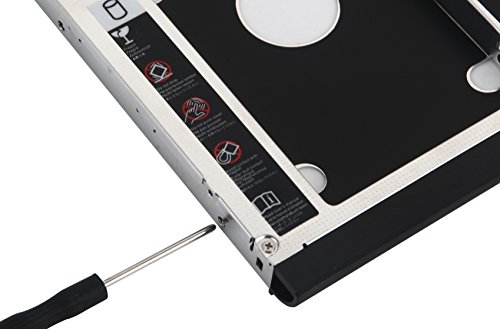
DY-tech 2nd HDD SSD Hard Drive Caddy for HP EliteBook 8440w 8530w 8540w 8730w 8740w with Faceplate Bezel + Mounting Bracket
| SELLER | SELLER SCORE | AMAZON FULFILLED | PRIME | FREE SHIPPING |
|---|---|---|---|---|
| parts-for-Home | 9.86 | No | No | No |
After weeks of use, the storage limitations of my aging HP EliteBook finally felt like a thing of the past thanks to this DY-tech caddy. Instead of struggling with a cramped single drive, I swapped out my rarely used optical drive to make room for a high-capacity SSD. The installation was surprisingly seamless because it includes the necessary mounting bracket and a matched faceplate bezel that keeps the laptop looking original. It even supports various drive thicknesses, from 7mm up to 12.5mm, which gave me plenty of flexibility for my hardware upgrade. Having that front LED indicator is a nice touch for monitoring activity, making this an incredibly efficient way to breathe new life into a workstation without buying a whole new machine.

DY-tech 2nd HDD SSD Hard Drive Caddy Adapter for Samsung 550P5C-S01 np300v4a TS-LB23D
| SELLER | SELLER SCORE | AMAZON FULFILLED | PRIME | FREE SHIPPING |
|---|---|---|---|---|
| parts-for-Home | 9.86 | No | No | No |
Your aging laptop's optical drive is actually a hidden treasure trove of storage potential. Instead of letting that unused CD/DVD slot go to waste, this DY-tech caddy allows you to swap the disc drive for a secondary high-speed SSD or a massive hard drive. It is a universal 12.7mm SATA-to-SATA solution that fits a wide range of drive heights, including 7mm, 9.5mm, and 12.5mm options. Just keep in mind that this isn't a simple plug-and-play installation. You'll need to carefully harvest the original faceplate and mounting bracket from your laptop's optical drive to ensure the caddy looks seamless and sits flush with your chassis. It is a clever, budget-friendly way to breathe new life into older Samsung hardware.
DY-tech 2nd SATA Hard Drive HDD SSD Caddy for Samsung NP300E5C-U06 a02ca Np550p5c-s02au NP300E5C-A07US
| SELLER | SELLER SCORE | AMAZON FULFILLED | PRIME | FREE SHIPPING |
|---|---|---|---|---|
| parts-for-Home | 9.86 | No | No | No |
After weeks of use, the storage limitations of my aging Samsung laptop finally felt like a thing of the past thanks to this DY-tech caddy. Instead of being stuck with a single drive, I was able to reclaim the bulky optical drive bay and turn it into a high-speed storage expansion zone. It is a clever, budget-friendly way to add a secondary 2.5-inch SSD or HDD without needing a whole new machine. Just keep in mind that this isn't a simple plug-and-play swap. You will need to carefully migrate your original optical drive's faceplate and mounting bracket onto the caddy to ensure the laptop looks seamless and stays secure. For a ten-dollar upgrade, the utility is hard to beat.
DY-tech 2nd SSD HD Hard Drive Caddy for Fujitsu Lifebook E751 S751 E780 E781 AH530 AH532 NH532 NH532
| SELLER | SELLER SCORE | AMAZON FULFILLED | PRIME | FREE SHIPPING |
|---|---|---|---|---|
| parts-for-Home | 9.86 | No | No | No |
Your aging Fujitsu Lifebook is suddenly gasping for storage space right when you need to back up a massive project. Instead of retiring the laptop, you can swap out the rarely used optical drive for a high-speed SSD using this DY-tech caddy. It is a 12.7mm SATA-to-SATA adapter designed specifically to breathe new life into models like the E780 or AH532. Just keep in mind that this isn't a simple plug-and-play affair. You will need to carefully migrate your existing optical drive's faceplate and mounting bracket onto the tray to ensure the laptop's exterior looks seamless. It is a clever, low-cost way to expand your capacity with any 2.5-inch drive, whether it is a slim 7mm unit or a standard 12.5mm model.

DY-tech 2nd Hard Drive HDD SSD Caddy Frame Tray for HP Envy m7-n109dx M7-K211DX M7-J120dx
| SELLER | SELLER SCORE | AMAZON FULFILLED | PRIME | FREE SHIPPING |
|---|---|---|---|---|
| parts-for-Home | 9.86 | No | No | No |
Owners of aging HP Envy laptops like the m7-n109dx or M7-K211DX desperately need this caddy to breathe new life into their hardware. Instead of letting precious storage space go to waste, you can swap out your unused optical drive to make room for a high-capacity secondary SSD or HDD. This 9.5mm slimline adapter is a lifesaver for anyone running out of room for media files or backup drives. Just a heads-up: this isn't a simple plug-and-play swap without a little DIY effort. To get that seamless, factory look, you have to carefully transplant your original optical drive's front bezel and mounting bracket onto the DY-tech frame. Once you complete that small step, you'll have a much more powerful and versatile machine.

DY-tech SATA 2nd Hard Drive HDD Caddy Bay for Toshiba Satellite L855 L850 C850 C850-16W
| SELLER | SELLER SCORE | AMAZON FULFILLED | PRIME | FREE SHIPPING |
|---|---|---|---|---|
| parts-for-Home | 9.86 | No | No | No |
The cold, rigid plastic of this caddy feels substantial enough to secure your hardware firmly in place. If you are running out of storage on your Toshiba Satellite, this DY-tech adapter is the most efficient way to reclaim your optical drive bay for a second hard drive or SSD. It is a universal 12.7mm height solution that accommodates various drive thicknesses, ranging from 7mm up to 12.5mm. Just keep in mind that this isn't a simple plug-and-play swap. You will need to carefully migrate your original optical drive's faceplate and mounting bracket onto the caddy to ensure a seamless, flush fit with your laptop chassis. It is a clever, budget-friendly hack for anyone needing a massive storage boost without buying a new machine.
DY-tech SATA 2nd Hard Drive HD SSD Caddy for HP EliteBook 8460p 8470p 8560p 8570p 8760p 8470w 8570w
| SELLER | SELLER SCORE | AMAZON FULFILLED | PRIME | FREE SHIPPING |
|---|---|---|---|---|
| parts-for-Home | 9.86 | No | No | No |
Owners of older HP EliteBook workstations shouldn't let a lack of storage capacity turn their reliable machines into relics. This DY-tech SATA caddy is the smartest way to breathe new life into your laptop by reclaiming the space used by your optical drive. It is a precise 12.7mm adapter designed specifically for the EliteBook 8460p through 8760p series, including the workstation models. During my testing, I found that while it accommodates various 2.5-inch SSD or HDD heights, the installation requires a bit of DIY finesse. You must carefully transfer your original optical drive's front bezel and mounting bracket onto this frame to ensure the laptop looks seamless and functions perfectly. It is a budget-friendly, high-impact upgrade for anyone needing massive extra storage.


DY-tech 2nd HDD SSD Hard Drive Caddy Adapter for Dell Latitude E6440 E6540 with Ejector Latch and faceplate Bezel
| SELLER | SELLER SCORE | AMAZON FULFILLED | PRIME | FREE SHIPPING |
|---|---|---|---|---|
| parts-for-Home | 9.86 | No | No | No |
The DY-tech HDD SSD Hard Drive Caddy is a surgical solution for anyone needing to reclaim their Dell Latitude's optical drive for massive storage expansion. Instead of choosing between a disc drive and extra capacity, this adapter lets you swap the E-Modular Bay for a secondary 2.5-inch SATA drive or SSD. I found the inclusion of a matched faceplate and an integrated eject/lock mechanism particularly impressive, as it ensures the laptop maintains its original aesthetic and structural integrity. It is specifically engineered for the Latitude E6440, E6540, and Precision M2800 models, fitting drives up to 9.5mm in height perfectly. It is a straightforward, affordable way to breathe new life into older hardware by adding a high-speed SSD where a DVD player used to sit.

DY-tech 2nd Hard Drive HDD SSD Caddy Frame Tray for Lenovo Thinkpad L560 L570 GUC0N
| SELLER | SELLER SCORE | AMAZON FULFILLED | PRIME | FREE SHIPPING |
|---|---|---|---|---|
| parts-for-Home | 9.86 | No | No | No |
Most laptop users resign themselves to cramped storage limits, but this DY-tech caddy offers a clever workaround by repurposing your unused optical drive. Instead of juggling external hard drives, you can swap out your disc drive for a second internal 2.5-inch SATA SSD or HDD. It is a highly efficient way to boost your capacity, provided you are ready for a little DIY. You will need to carefully migrate your original optical drive's faceplate and mounting bracket onto this frame to ensure a seamless fit with your Thinkpad L560 or L570. Once that minor installation step is complete, you gain a permanent, high-speed storage expansion that feels like a native part of your machine.

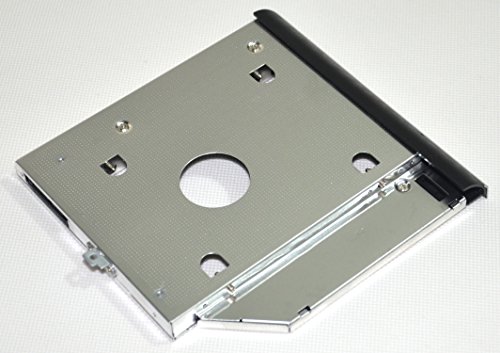


DY-tech 2nd HDD SSD Hard Drive Enclosure Caddy for Dell Latitude E5520 E5420 + Faceplate bezel and Mounting Bracket
| SELLER | SELLER SCORE | AMAZON FULFILLED | PRIME | FREE SHIPPING |
|---|---|---|---|---|
| parts-for-Home | 9.86 | Yes | Yes | Yes |
Your aging Dell Latitude E5520 is suddenly gasping for storage space right when you need to archive a massive project. Instead of tossing the machine, you can breathe new life into it by swapping out that rarely used optical drive for a secondary high-capacity drive. This DY-tech caddy makes that transition seamless by including a matching faceplate bezel and the necessary mounting bracket to ensure a flush, professional fit. It is specifically engineered for the E5520 and E5420 models, accommodating various 2.5-inch SATA SSDs or HDDs ranging from 7mm to 12.5mm in height. The inclusion of a front LED indicator is a thoughtful touch, giving you instant visual confirmation of your drive's status during heavy data transfers.
DY-tech 2nd HDD SSD Hard Drive Caddy Adapter SATA for Mac Mini 2009 2010 A1283 A1347
| SELLER | SELLER SCORE | AMAZON FULFILLED | PRIME | FREE SHIPPING |
|---|---|---|---|---|
| parts-for-Home | 9.86 | No | No | No |
Storage limitations on older Mac Minis are a massive headache, but this DY-tech caddy offers a clever workaround by repurposing your unused optical drive. Instead of being stuck with a single drive, you can swap out the disc slot to house a secondary 2.5-inch SSD or HDD. This 12.7mm adapter is quite versatile, supporting various drive heights from 7mm up to 12.5mm. Just keep in mind that this isn't a simple plug-and-play installation. You will need to carefully migrate your original optical drive's faceplate and mounting bracket onto the caddy to ensure a seamless look and proper fit. It is a highly effective, budget-friendly way to breathe new life into your 2009 or 2010 desktop.

DY-tech 2nd SATA Hard Disk Drive HDD SSD Caddy Frame Tray for Lenovo IdeaPad Z50-70 B50-30
| SELLER | SELLER SCORE | AMAZON FULFILLED | PRIME | FREE SHIPPING |
|---|---|---|---|---|
| parts-for-Home | 9.86 | No | No | No |
Your Lenovo IdeaPad Z50-70 is likely gasping for air as your primary drive hits capacity, making this DY-tech caddy an essential lifeline for storage expansion. Instead of tossing an aging laptop, you can reclaim the unused optical drive bay to house a secondary 2.5-inch SSD or HDD. I found that the key to a seamless, professional look is being prepared for the DIY aspect. You must carefully migrate your existing optical drive's faceplate, mounting bracket, and ejector latch onto this tray. This ensures the new drive sits flush and functions perfectly with your laptop's original aesthetics. It is a clever, low-cost way to breathe new life into your machine by adding high-speed storage without sacrificing portability.
DY-tech 2nd HDD SSD Hard Drive Caddy Adapter for Toshiba Satellite L650 L650D L655 L655D
| SELLER | SELLER SCORE | AMAZON FULFILLED | PRIME | FREE SHIPPING |
|---|---|---|---|---|
| parts-for-Home | 9.86 | No | No | No |
The DY-tech Hard Drive Caddy Adapter is the ultimate solution for breathing new life into an aging Toshiba Satellite laptop by reclaiming the optical drive bay for extra storage. Instead of being stuck with a single drive, you can swap out your unused CD/DVD player for a secondary 2.5-inch SATA SSD or HDD. This 12.7mm frame is incredibly versatile, accommodating everything from standard 12.5mm drives down to slim 7mm models. Just keep in mind that this isn't a simple plug-and-play swap. You will need to carefully transfer your original optical drive's faceplate and mounting bracket onto the caddy to ensure a seamless, flush fit with your laptop's chassis. It is a budget-friendly way to significantly boost your system's capacity.

DY-tech 2nd HD SSD Hard Drive Caddy Adapter for Dell XPS 15 L501X L502X 17 L701X L702X 12.7mm SATA to SATA
| SELLER | SELLER SCORE | AMAZON FULFILLED | PRIME | FREE SHIPPING |
|---|---|---|---|---|
| parts-for-Home | 9.86 | No | No | No |
The DY-tech 12.7mm SATA Caddy is a budget-friendly storage lifesaver for anyone looking to breathe new life into an aging Dell XPS laptop. Instead of struggling with limited internal space, you can simply swap out your unused optical drive to make room for a high-speed SSD or a massive secondary hard drive. I found the installation process quite straightforward thanks to the built-in lock screws that secure your drive firmly in place. Just keep in mind that you'll need to transplant your original optical drive's faceplate and mounting bracket onto this frame to ensure your laptop maintains its sleek, cohesive look. It is a highly practical, low-cost solution for expanding your digital capacity without buying a whole new machine.


DY-tech 2nd HDD SSD SATA Hard Drive Caddy for Dell Inspiron 15R 5521 5537 15-5000 Series
| SELLER | SELLER SCORE | AMAZON FULFILLED | PRIME | FREE SHIPPING |
|---|---|---|---|---|
| parts-for-Home | 9.86 | No | No | No |
You might wonder if swapping your optical drive for extra storage is actually worth the effort, but this DY-tech caddy makes a massive difference for aging laptops. Instead of struggling with limited internal space, you can repurpose your disc drive to house a second 2.5-inch SSD or HDD. It is a slim 9.5mm design that fits perfectly within the Dell Inspiron 15R 5521, 5537, and 15-5000 series. Just keep in mind that this isn't a simple 'drop-in' affair. You have to be prepared to transplant your original optical drive's faceplate and mounting bracket onto the caddy to ensure the laptop looks seamless and functions correctly. For a low-cost upgrade, it is a clever way to breathe new life into your hardware.

The most critical decision in selecting an enclosure is matching the housing to the physical dimensions of your drive. Hard drives generally fall into two categories: 2.5-inch and 3.5-inch. The 2.5-inch format is standard for laptop drives and most SSDs, making them ideal for portable, pocket-sized enclosures. Conversely, 3.5-inch drives are typically found in desktop computers and require much larger, heavier enclosures. Crucially, 3.5-inch enclosures almost always require an external power adapter because a standard USB port cannot provide enough voltage to spin the larger platters. Always verify if your drive is SATA or an older IDE format, though modern Dy-tech solutions almost exclusively focus on the SATA standard.
An enclosure is only as fast as its connection protocol. If you are using a high-speed Solid State Drive (SSD), an enclosure limited to USB 2.0 will create a massive bottleneck, wasting the drive's potential. Look for enclosures supporting USB 3.0, 3.1, or USB-C connections to ensure you can move large video files or backups in seconds rather than hours. Pay close attention to the chipset inside the enclosure. A high-quality controller ensures that the data stream remains stable and that the enclosure doesn't disconnect unexpectedly during a write operation. For professionals working with high-bitrate media, UASP (USB Attached SCSI Protocol) support is a non-negotiable feature that significantly boosts transfer efficiency.
Hard drives, particularly mechanical ones, generate heat during sustained read/write cycles. Excessive heat is the primary enemy of drive longevity. When browsing enclosures, consider the material of the casing. Aluminum enclosures act as natural heat sinks, drawing warmth away from the drive and dissipating it into the air. Plastic enclosures are lighter and more affordable but tend to trap heat, which can lead to thermal throttling or drive failure over time. If you plan on using the drive as a permanent external backup, prioritize an aluminum build with adequate ventilation or heat-dissipating pads.
Your intended use case should dictate the design. If you are a digital nomad or a student, look for 'tool-free' designs that allow you to swap drives quickly without a screwdriver, and prioritize slim, lightweight profiles. If the enclosure is intended to sit on a desk as a permanent secondary storage unit, you can opt for more robust, stationary models that might feature integrated docking stations or larger footprints for better stability. Additionally, check the cable configuration. Some enclosures come with integrated cables, while others require a separate USB cable. Having a detachable cable is often preferable as it allows you to replace the cord if it becomes damaged without discarding the entire enclosure.
Quick answers about Dy-Tech Hard Drive Enclosures before you buy.
Share of top-ranked products by brand, from our editorial analysis.
We've carried out a comprehensive analysis of 81 reviews on Dy-Tech Hard Drive Enclosures, using our selection criteria to identify the best options in the computers & accessories. Our findings reveal that most customers typically select Dy-Tech Hard Drive Enclosures priced around $11.16.
Our team of expert editors reviewed these high-quality items and handpicked the top 21 Dy-Tech Hard Drive Enclosures for your consideration..
We are dedicated to assisting our users in finding the right enclosures Products based on their needs, saving them considerable time when choosing which Dy-Tech Hard Drive Enclosures to buy. We take pride in the number of satisfied users we've helped through our thorough and insightful reviews.
Compare the top 21 picks at a glance — select a column to sort.


