#TOP1

Whether you are a professional concept artist, a hobbyist digital illustrator, or a student venturing into graphic design, choosing the right hardware is the foundation of your creative workflow. XP-Pen has carved out a significant niche in the market by offering a versatile range of tools that bridge the gap between entry-level accessibility and professional-grade precision. Unlike generic peripherals, a drawing tablet is an extension of your hand, meaning the nuances of pressure sensitivity, surface texture, and display quality can make or break your artistic experience. This guide is designed to help you navigate the specific technical landscape of XP-Pen hardware so you can invest in a device that complements your unique style.
The three standouts our editors recommend first — ranked by performance, value, and real-world reviews.


XP-PEN Artist12 11.6 Inch FHD Drawing Monitor Pen Display Graphic Monitor with PN06 Battery-Free Pen Multi-Function Pen Holder and Glove 8192 Pressure...
| SELLER | SELLER SCORE | AMAZON FULFILLED | PRIME | FREE SHIPPING |
|---|---|---|---|---|
| XP-PEN Technology | 9.82 | Yes | Yes | Yes |
Most digital artists struggle through the disconnect of drawing on a tablet while staring at a separate monitor, but the XP-PEN Artist12 bridges that gap by putting your canvas directly under your pen. This 11.6-inch FHD display delivers surprisingly punchy colors with its 72% NTSC gamut, making it a legitimate tool for serious sketching and photo editing. I found the P06 battery-free stylus incredibly natural to use. The hexagonal grip prevents slipping, and the built-in eraser at the end mimics a traditional pencil workflow perfectly. The slim touch bar and six customizable shortcut keys add a layer of tactile efficiency that standard tablets lack. Whether you are teaching via Zoom or sculpting in 3D, this compact display turns your computer into a professional-grade creative workstation without breaking the bank.
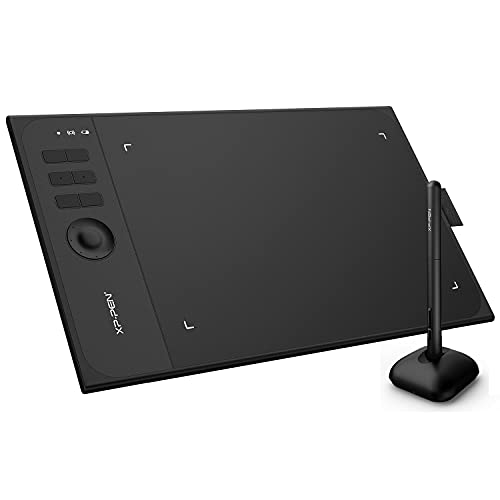


XP-Pen Star06 Wireless 2.4G Graphics Drawing Tablet Digital Tablet Painting Board with 6 Hot Keys-10x6 Inch
| SELLER | SELLER SCORE | AMAZON FULFILLED | PRIME | FREE SHIPPING |
|---|---|---|---|---|
| XP-PEN Technology | 9.82 | Yes | Yes | Yes |
Tangled cables often break the creative flow of digital artists, which is exactly why the XP-PEN Star06 introduces much-needed wireless freedom to your desk. I found the dual-mode connectivity incredibly versatile. You can use the 2.4G USB receiver for a clutter-free setup or stick to the USB cable for traditional wired reliability. The 10x6 inch workspace feels expansive enough for detailed brushwork, and the battery life is surprisingly robust, offering up to 16 hours of use after just a two-hour charge. I particularly enjoyed the tactile response of the six shortcut keys and the integrated dial, which make navigating software much faster. Plus, the battery-free stylus with 8192 pressure levels ensures you never have to worry about mid-stroke power failures.


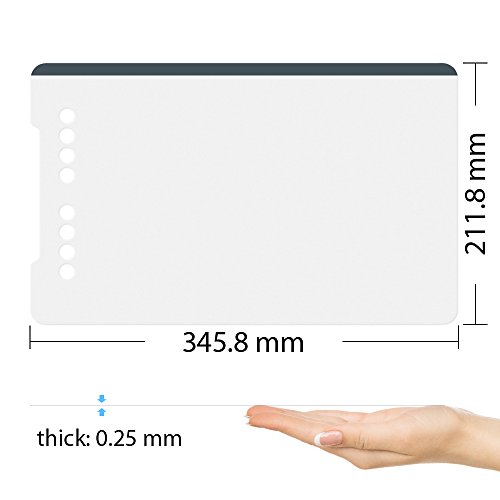


XP-PEN Protector Suitable for XP-PEN Deco 01 and Deco 01 V2 Graphic Drawing Tablet Protective Film (Pack of 2)
| SELLER | SELLER SCORE | AMAZON FULFILLED | PRIME | FREE SHIPPING |
|---|---|---|---|---|
| XP-PEN Technology | 9.82 | Yes | Yes | Yes |
Your digital canvas is constantly under siege from the friction of a stylus tip, making surface protection a necessity rather than an afterthought. I picked up this two-pack of XP-PEN protective films to safeguard my Deco 01 against the inevitable scratches that come with long digital illustration sessions. At 345.8 x 211.8 mm, these films are precision-cut to fit the tablet perfectly, ensuring your drawing area remains smooth and responsive. Having two sheets in a single pack is a smart move for artists. It gives you a backup ready to go the moment a film eventually wears down from heavy use. It is a simple, low-cost way to extend the lifespan of your hardware and keep that initial drawing feel intact.


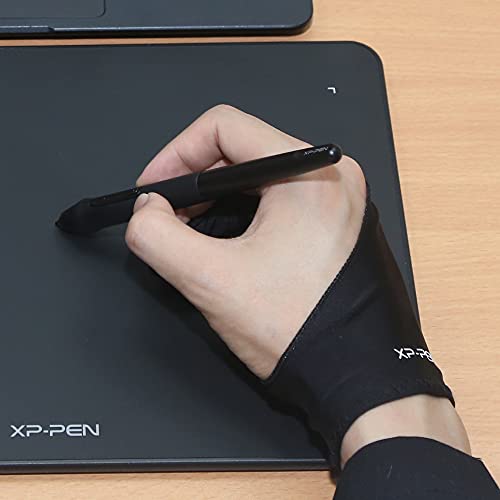

XP-PEN Professional Artist Glove for Graphics Drawing Tablet Graphic Monitor Suitable for Right Hand and Left Hand Free Size
| SELLER | SELLER SCORE | AMAZON FULFILLED | PRIME | FREE SHIPPING |
|---|---|---|---|---|
| XP-PEN Technology | 9.82 | Yes | Yes | Yes |
The XP-PEN Professional Artist Glove is a specialized friction-reducer that transforms how your hand glides across a digital canvas. After testing this two-finger design, I found the soft, smooth material makes long drawing sessions feel significantly more elegant by minimizing skin drag on the tablet surface. It is specifically engineered for graphics monitors and tablets, ensuring you get that effortless movement without accidentally triggering touch-sensitive features. Because it is a free-size design, it works equally well for both left and right-handed artists. The understated black aesthetic keeps your workspace looking professional, and at its current price point, it is a highly accessible way to improve your ergonomic comfort while working on high-end digital displays.


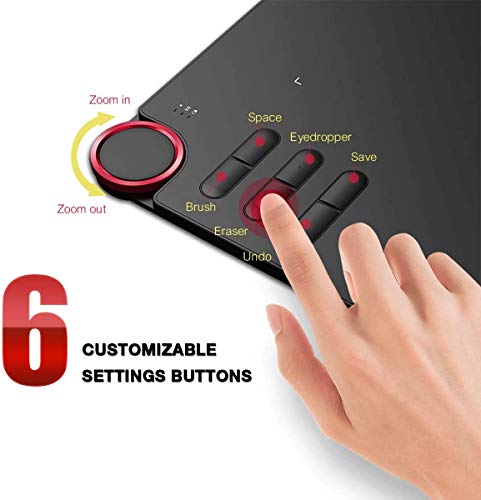
XP-PEN Deco 03 Graphics Drawing Tablet, Wireless Digital Tablet with 6 Shortcut Keys, Red Dial Knob, Battery-Free Passive Stylus of 8192 Levels Pressu...
| SELLER | SELLER SCORE | AMAZON FULFILLED | PRIME | FREE SHIPPING |
|---|---|---|---|---|
| OCEANLYKJ | 7.87 | Yes | Yes | Yes |
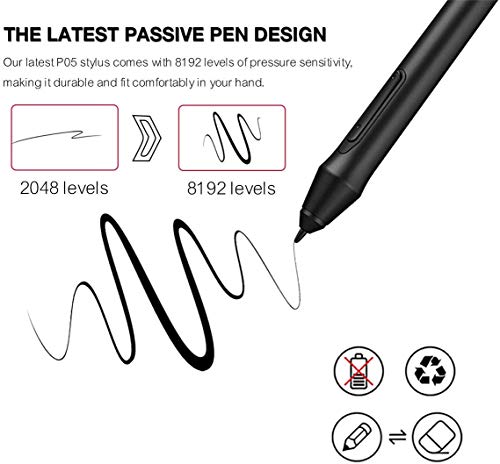
Can a professional-grade creative workflow really fit inside an 8mm ultra-thin chassis? The XP-PEN Deco 03 proves that you don't need a bulky setup to achieve precision, offering a generous 10 x 6.25 inch working area that feels expansive for its lightweight, portable design. I was particularly impressed by the P03 stylus. With 8192 levels of pressure sensitivity and no battery to charge, it mimics a natural pen almost perfectly. The inclusion of a red dial knob and eight customizable express keys makes navigating software like Photoshop or Illustrator feel incredibly fluid. Whether you are a beginner or a seasoned pro, the combination of the active LED edge lighting and the responsive, lag-free surface creates a seamless digital canvas that moves at the speed of your imagination.


XP-PEN Deco 03 Drawing Tablet, 8091 Level Pen Stylus, Battery-Free, 2.4G Wireless Connectivity, Shortcut Dial, Programmable Buttons, Works with Window...
| SELLER | SELLER SCORE | AMAZON FULFILLED | PRIME | FREE SHIPPING |
|---|---|---|---|---|
| Yooson Mall | 7.72 | Yes | Yes | Yes |
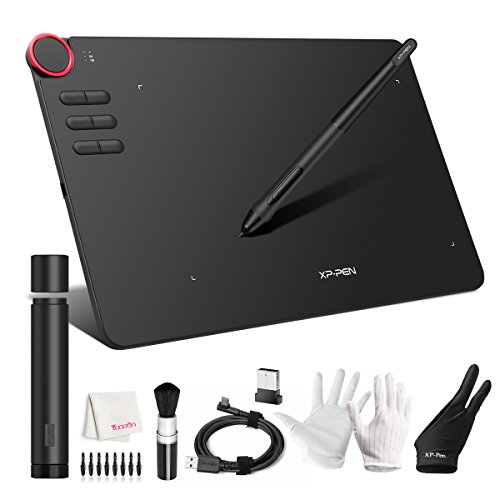
Digital illustrators on a budget shouldn't have to sacrifice tactile control for affordability. The XP-PEN Deco 03 bridges that gap by providing a 10 x 5.62-inch surface that actually mimics the friction of real paper, which makes a massive difference when you're trying to nail fine details. I was particularly impressed by the multi-function rolling dial. Being able to zoom and rotate with a physical gesture feels much more intuitive than hunting through software menus. The battery-free stylus is lightweight and ergonomic, supporting 8192 levels of pressure sensitivity that respond naturally to your hand. Whether you are working in Photoshop or Clip Studio, the ability to fully customize the six programmable express keys makes this a legitimate workflow powerhouse for both Windows and Mac users.


Drawing Tablet XP-PEN Star05 V2 Wireless 2.4G Graphics Pen Tablets 8X5 Inch Digital Tablet with Touch Hot Key and 8192 Pressure Level Battery-Free Sty...
| SELLER | SELLER SCORE | AMAZON FULFILLED | PRIME | FREE SHIPPING |
|---|---|---|---|---|
| XP-PEN Technology | 9.82 | Yes | Yes | Yes |
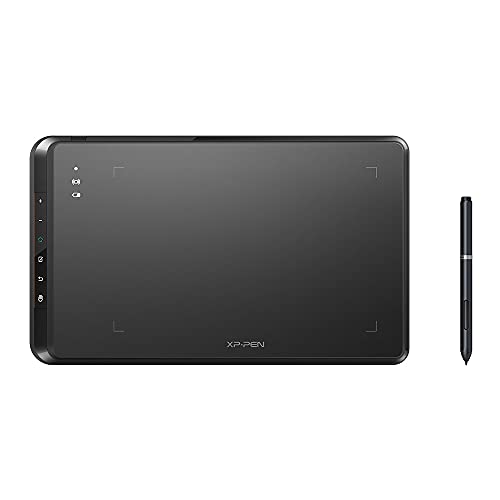
The XP-PEN Star05 V2 breaks the tether of traditional digital art with its seamless 2.4G wireless connectivity. While many entry-level tablets force you into a cluttered desk setup, this unit offers the freedom of a wireless ISM 2.4G connection or the reliability of a standard USB wired mode. The 8x5 inch workspace feels substantial for sketching, and the battery-free stylus provides incredibly smooth 8192 pressure levels without the annoyance of mid-project charging. I found the six touch-sensitive shortcut keys particularly useful for jumping between tools in Photoshop or Clip Studio Paint. Whether you are teaching a remote class via Zoom or signing documents in Microsoft Office, this tablet offers a precision that a standard mouse simply cannot match.


XPPen Drawing Tablet Deco MW Bluetooth Wireless Computer Graphics Tablet, Battery-Free X3 Stylus and 8 Shortcut Keys, Compatible with Chrome OS, Windo...
| SELLER | SELLER SCORE | AMAZON FULFILLED | PRIME | FREE SHIPPING |
|---|---|---|---|---|
| XP-PEN Technology | 9.82 | Yes | Yes | Yes |
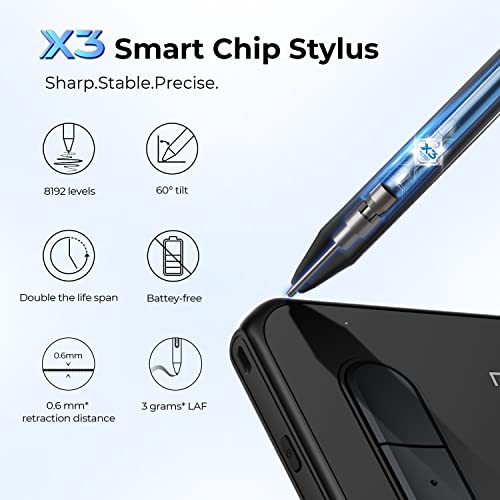
The most cluttered part of a digital artist's desk isn't actually the hardware, but the web of cables keeping it powered. The Deco MW solves this headache by utilizing a Bluetooth 5.0 chip that finally lets you ditch the cord and reclaim your creative space. I was particularly impressed by the new X3-Smart-Chip Stylus. The response time feels incredibly snappy, and the 8192 levels of pressure sensitivity make even the most delicate line work feel natural. With eight customizable shortcut keys featuring tactile bumps, you can navigate software like Photoshop or Krita without constantly reaching for a keyboard. It is a remarkably versatile little powerhouse that works across everything from Windows to Android.


Turcom Graphics Tablet Drawing Touch Pen for Windows and Mac - 5.5 '' x 4" Black Surface Area Ideal for Kids and Artists (TS-6540)
| SELLER | SELLER SCORE | AMAZON FULFILLED | PRIME | FREE SHIPPING |
|---|---|---|---|---|
| Value Max | 9.86 | No | No | No |
Budget-conscious beginners and young digital artists need the Turcom Aura to bridge the gap between mouse clicking and true creative expression. This compact tablet offers a surprisingly responsive experience for its price point, featuring a 4000 DPI resolution that keeps your lines crisp. I found the 2048 levels of pressure sensitivity to be quite impressive for entry-level work, allowing for natural variations in line weight that mimic a real pen. The 5.5 x 4 inch surface area is perfectly sized for a desk setup without being overwhelming, and the 200 reports per second ensure your strokes feel fluid rather than laggy. Whether you are running Windows or Mac, the included drivers make getting started a straightforward process for anyone ready to dive into digital illustration.
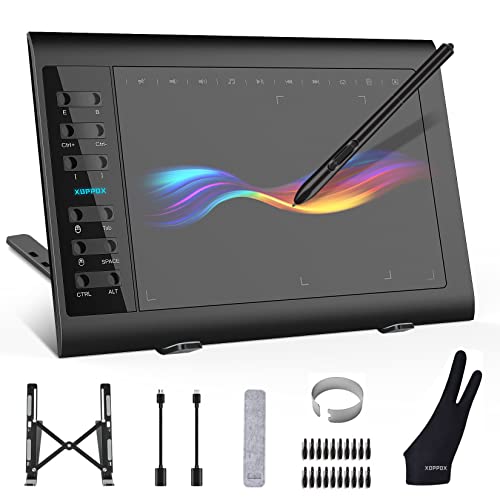


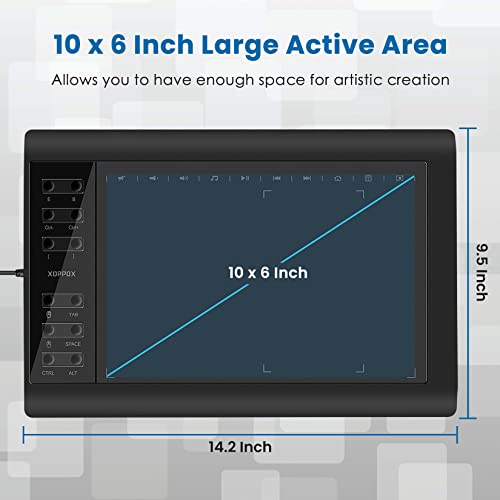
XOPPOX Graphics Drawing Tablet 10 x 6 Inch Large Active Area with 8192 Levels Battery-Free Pen and 12 Hot Keys, Compatible with PC/Mac/Android OS for...
| SELLER | SELLER SCORE | AMAZON FULFILLED | PRIME | FREE SHIPPING |
|---|---|---|---|---|
| JX-xoppox | 8.64 | Yes | Yes | Yes |
The XOPPOX Graphics Drawing Tablet stands as a formidable entry-level powerhouse for digital artists and remote educators alike. The 10 x 6 inch active area provides ample breathing room for detailed sketching, while the 8192 levels of pressure sensitivity ensure your strokes feel remarkably natural and fluid. I was particularly impressed by the battery-free pen. You never have to worry about mid-project power failures, and the inclusion of 20 replacement nibs is a thoughtful touch for long-term use. With 12 customizable shortcut keys and additional multimedia buttons for Windows users, your workflow stays streamlined. Whether you are navigating Photoshop or teaching a live online class via Microsoft Office, this tablet bridges the gap between professional utility and budget-friendly accessibility.


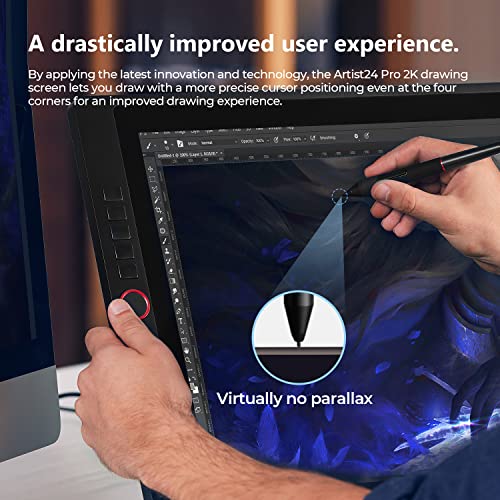

XP-PEN Artist24Pro 2K Drawing Tablet with Screen 23.8" Graphic Drawing Monitor Pen Display with 20 Customizable Shortcut Keys and Battery-Free Stylus...
| SELLER | SELLER SCORE | AMAZON FULFILLED | PRIME | FREE SHIPPING |
|---|---|---|---|---|
| XP-PEN Drawing Tablets | 6.06 | No | No | No |
The XP-PEN Artist24Pro redefines the professional workspace with its massive 23.8-inch 2K QHD display. Moving from standard FHD to this 2560 x 1440 resolution makes a world of difference, offering double the pixel density for much sharper, more realistic digital sketches. I was particularly impressed by the color accuracy, which hits 90% Adobe RGB, ensuring your designs look exactly as intended. The workflow is incredibly intuitive thanks to the 20 customizable shortcut keys and two red dials positioned for both left and right-handed artists. With a battery-free stylus that supports 60-degree tilt and a built-in USB hub for your peripherals, this tablet feels like a complete, professional command center for any serious animator or graphic designer.




Drawing Tablet-XP-Pen G430S OSU Tablet Graphic Drawing Tablet with 8192 Levels 4 x 3 inch Ultrathin Tablet & Travel Cable Case Organizer Accessories T...
| SELLER | SELLER SCORE | AMAZON FULFILLED | PRIME | FREE SHIPPING |
|---|---|---|---|---|
| XP-PEN Technology | 9.82 | Yes | Yes | No |
Competitive OSU! players and budget-conscious digital artists will find this specialized setup to be an absolute game-changer for their setup. The XP-PEN G430S focuses heavily on responsiveness, making it a much more precise alternative to a standard mouse for both gaming and sketching. I was particularly impressed by the battery-free PN01 stylus. You never have to worry about mid-session charging, which is vital when you are in the zone. With 8192 levels of pressure sensitivity packed into a compact 4 x 3 inch active area, the control feels incredibly fluid. The inclusion of a water-resistant nylon organizer case also makes this a highly portable kit for anyone who needs to move their workstation on the go.


Wacom Bamboo Splash Pen Tablet Graphics Tablet Ctl471 for Pc/MAC Birthday & Mothers Day Gift for Artist Designer Drawing Learning
| SELLER | SELLER SCORE | AMAZON FULFILLED | PRIME | FREE SHIPPING |
|---|---|---|---|---|
| Electronics by JB | 6.63 | No | No | No |
Can a compact device truly bridge the gap between traditional sketching and digital mastery? The Wacom Bamboo Splash makes a compelling case for entry-level creators looking to dive into digital painting without a massive footprint. With 1024 levels of pressure sensitivity and a resolution of 2540 lpi, the pen input feels remarkably natural, allowing for nuanced strokes that mimic real ink or pencil. Its 8.3-inch surface provides enough room for meaningful movement while remaining portable enough for a student's desk. I particularly like the reversible orientation, which makes it a seamless choice for both right-handed and left-handed artists. Whether you are learning the basics or designing professional assets, the ergonomic pen and high accuracy of +/- 0.5 mm ensure your digital lines stay exactly where you intend them to be.


Q Flex Pad Flexible Digital Media Graphic Tablet
| SELLER | SELLER SCORE | AMAZON FULFILLED | PRIME | FREE SHIPPING |
|---|---|---|---|---|
| iVistaTablet | 8.60 | No | No | No |
Digital nomads and mobile presenters will find the iVistaTablet Q Flex Pad to be an absolute game-changer for their portable workstations. This ultra-thin, flexible device is so lightweight that it slides into a laptop sleeve without adding any noticeable bulk, making it perfect for on-the-go creativity. I was impressed by how versatile it is. You can use it as a high-resolution graphic tablet with 1024 levels of pen pressure, or simply swap your mouse for the wireless pen to use it as a dedicated mouse pad. Whether you are a graphic artist, a student engaged in e-learning, or a professional delivering business presentations, the included software like Power Presenter and Office Ink adds immediate value. It is a surprisingly capable tool that bridges the gap between simple navigation and professional digital artistry.

The first and most critical decision you must make is whether you want a Pen Display or a traditional Pen Tablet. A Pen Display is a monitor that you draw directly onto, providing a more intuitive, natural experience similar to drawing on paper. These are excellent for precision work and reducing the cognitive load of hand-eye coordination. On the other hand, a Pen Tablet (often called a graphics tablet) is a non-screen peripheral that connects to your computer. You look at your monitor while your hand moves on the tablet surface. While this requires a brief learning period to master the spatial mapping, these tablets are often more ergonomic for long sessions and significantly more portable and budget-friendly.
For an artist, the 'feel' of the pen is everything. XP-Pen devices typically offer high levels of pressure sensitivity, often reaching 8,192 levels. This determines how much the line thickness or opacity changes based on how hard you press. When comparing models, don't just look at the number. Look at the initial activation force (IAF). A high-quality pen should register a stroke even with the lightest touch. Additionally, ensure the tablet supports tilt functionality. Tilt support allows you to shade and vary your strokes by angling the pen, much like a real charcoal pencil or brush, adding a layer of organic realism to your digital art.
If you opt for a Pen Display, the screen is your most important asset. You must look closely at the color gamut coverage. For professional illustrators, a wide color gamut (such as high percentages of sRGB or Adobe RGB) is non-negotiable to ensure that the colors you see on your screen are what actually print or appear on other devices. Resolution is the next factor. While Full HD is standard for smaller tablets, larger displays should ideally offer higher pixel densities to avoid seeing the 'screen door effect' when working on fine details. Furthermore, consider the lamination of the screen. Fully laminated displays reduce the gap between the pen tip and the digital cursor, providing a much more seamless 'pen-on-paper' sensation.
The physical interaction between the nib and the tablet surface dictates your control. Some artists prefer a smooth, glass-like surface for speed, while others require a matte, textured finish to provide tactile resistance. XP-Pen often incorporates etched glass or specialized film to mimic the friction of paper. Beyond the surface, consider the ergonomics of the device. If you are a professional working 8-hour shifts, look for tablets that offer adjustable stands or compatibility with various mounting solutions to prevent wrist strain and maintain a healthy posture.
Finally, consider how the tablet integrates into your current setup. Some models offer single-cable USB-C connections, which simplify your desk space, while others may require multiple cables for power and data. Ensure the tablet is fully compatible with your preferred software ecosystem, whether you are using industry-standard illustration suites or open-source painting programs. Checking for driver stability and ease of installation is a vital step in ensuring your creative flow is never interrupted by technical friction.
Quick answers about Xp-Pen Drawing Tablets before you buy.
Share of top-ranked products by brand, from our editorial analysis.
We've carried out a comprehensive analysis of 16,825 reviews on Xp-Pen Drawing Tablets, using our selection criteria to identify the best options in the computers & accessories. Our findings reveal that most customers typically select Xp-Pen Drawing Tablets priced around $124.34.
Our team of expert editors reviewed these high-quality items and handpicked the top 14 Xp-Pen Drawing Tablets for your consideration..
We are dedicated to assisting our users in finding the right tablets Products based on their needs, saving them considerable time when choosing which Xp-Pen Drawing Tablets to buy. We take pride in the number of satisfied users we've helped through our thorough and insightful reviews.
Compare the top 14 picks at a glance — select a column to sort.


