How to Choose a TV: OLED vs QLED vs LED Explained
Here's the short version. OLED and QLED aren't really two competing technologies in the way the marketing suggests. QLED is a feature layered onto LED, not a separate category from it. The real split is self-emissive versus backlit. Once you understand that one distinction, everything else on the spec sheet makes a lot more sense.
A note on the numbers in this guide. Brightness, dimming zone counts, and burn-in figures below reflect current-generation panels and independent lab testing patterns as of 2025 and 2026. This category moves fast, and manufacturers refresh their lineups on roughly annual cycles. A comparison from three years ago is already outdated, and even a comparison from last year's models may not reflect what's currently on shelves.
The One Distinction That Actually Matters
Forget the three-way comparison for a second. There are really only two architectures here.
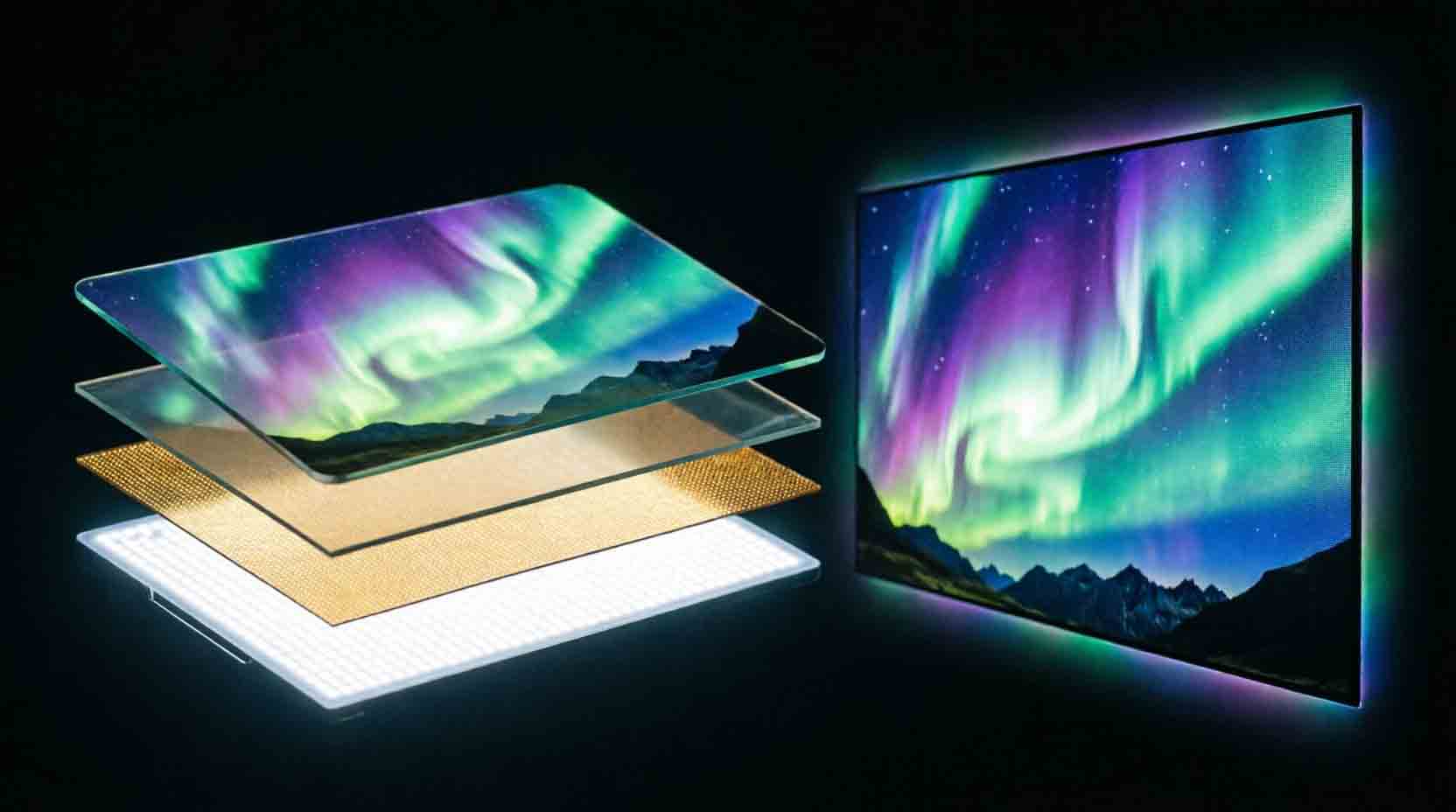
OLED pixels generate their own light. Each one switches on, dims, or turns fully off, individually. When a pixel needs to show black, it just stops emitting light entirely. That's what gives OLED its true black levels.
QLED and standard LED are both backlit LCD panels. A grid of LEDs sits behind the screen, shining through a layer of liquid crystals. Black isn't really black here. It's the backlight dimmed as much as the panel can manage, which is good but not perfect.
So where does QLED fit? QLED adds a quantum dot film over that same LED backlight, which improves color volume and brightness. It's a real upgrade. But it's still fundamentally the same backlit architecture as plain LED. Not a separate tier. A feature bolted onto the existing platform.
Marketing treats OLED, QLED, and LED like three equal options on a shelf. They're not. It's really one architecture (self-emissive) against one architecture with a feature variant (backlit, with or without quantum dots).
OLED vs QLED vs LED Compared
|
Factor |
OLED |
QLED |
Standard LED |
|
Black levels |
True black, pixel by pixel |
Good, not perfect, backlight-dimmed |
Good, not perfect, backlight-dimmed |
|
Peak brightness |
Strong, improving each generation |
Very high, often the brightest option |
Moderate |
|
Viewing angle |
Wide, consistent off-center |
Narrows off-center, especially older panels |
Narrows off-center |
|
Burn-in risk |
Low with modern mitigation, not zero |
Effectively none |
Effectively none |
|
Typical price at 65 inches and up |
Higher |
Mid to high |
Lower |
Brightness got a lot closer than people assume. Independent testing on recent flagship OLED panels has clocked peak brightness around 2,000 to 2,100 nits in consumer units, with some lab results pushing higher. Flagship Mini-LED and QLED sets have hit 4,500 nits or more in real-world measurement, with some marketing claims reaching toward 5,000. QLED still wins on raw brightness. But the gap isn't the canyon it used to be.
Contrast on backlit panels comes down to dimming zones. More zones means the backlight can get brighter and darker in smaller sections, reducing that washed-out look older LED TVs were known for. Some current flagship Mini-LED models run into the thousands of zones, with certain large-screen flagship models pushing past 20,000 in the most extreme cases. That's a real, measurable jump from older LED TVs with a few dozen zones total.
Blooming is the trade-off worth knowing about. Even with thousands of zones, a backlit panel can still show a faint halo of light around a bright object against a dark background, since each zone lights a small area rather than a single pixel. OLED doesn't have this issue at all, since every pixel controls its own light independently. It's a small effect in most content, but it shows up clearly in scenes like bright text on a black screen or a starfield.
Does OLED Really Get Burn-In?
Short answer: the risk is real but low with a modern panel and normal viewing habits. It's not the ticking time bomb some forum threads make it sound like, and it's not a total non-issue either. Somewhere between the two extremes is the honest answer, and the specifics matter more than a flat yes or no.
Burn-in happens when a static image sits on screen at high brightness for extended stretches, and the organic materials in that specific spot wear differently than the rest of the panel. A channel logo in the corner, a game's health bar, a news ticker running for hours a day.
Panels made from roughly 2022 onward include real mitigation. Pixel shifting nudges the image slightly so the same pixels aren't lit constantly. Logo dimming detects static bright elements and reduces their intensity. Periodic pixel refresh cycles even out wear across the panel.
QLED and standard LED use inorganic materials, so they're not susceptible to permanent burn-in the same way. They can show temporary image retention, which usually clears up on its own within minutes to hours. That's a different, much less serious issue than OLED's degradation risk.
If you watch varied content and don't run static high-brightness elements for hours daily, modern OLED burn-in risk is genuinely low. If you're a competitive gamer with a static HUD on screen for six-plus hours a day at max brightness, that's a real scenario where the risk climbs, and it's worth factoring in.
Which Technology Fits Your Room?
This is the decision that actually matters more than which acronym sounds more premium.
|
Room type |
Recommended technology |
Why |
|
Bright, sun-filled living room |
QLED or Mini-LED |
Higher peak brightness cuts through glare and ambient light |
|
Dark, dedicated home theater |
OLED |
True blacks and contrast shine when there's no competing light source |
|
Mixed lighting, general use |
Either, lean QLED for flexibility |
Backlit panels handle a wider range of lighting conditions without major compromise |
|
Gaming-focused, static HUDs for long sessions |
QLED or Mini-LED |
Removes burn-in risk from the equation entirely |
|
Gaming-focused, varied content, no static overlays |
OLED |
Fast pixel response and deep blacks, minimal real burn-in risk with normal use |
The PickSmartly Room-First Rule. Before comparing a single spec, figure out your room's typical lighting and your primary use case. Those two things eliminate an entire technology category before price or brand name ever enters the conversation. Shopping by brand reputation first is optimizing the wrong variable.
HDR and Gaming Specs Worth Checking
Panel technology isn't the only thing that affects picture quality. A few other specs matter enough to check before you buy, regardless of which architecture you land on.
HDR format support varies by brand and model, not just by panel type. Look for HDR10 as the baseline, with Dolby Vision or HDR10+ as meaningful upgrades if your source content supports them. A TV with a great panel but no Dolby Vision support will still look flatter than it should on content mastered for it.
Response time affects motion clarity, especially in fast-moving games or sports. OLED panels generally respond faster at the pixel level, since there's no liquid crystal layer to physically shift. This shows up as less motion blur during fast camera pans or quick game movement, though the difference is more noticeable to some viewers than others.
Input lag matters more for competitive gaming than casual viewing. Most current TVs offer a dedicated game mode that strips out unnecessary processing to cut input lag significantly, often down into the single digits of milliseconds. Check whether game mode is available at your target resolution and refresh rate, since some models only hit their lowest lag numbers at lower resolutions.
Refresh rate claims deserve a second look. A 120Hz panel genuinely benefits fast-motion content and gaming, but confirm it's a native refresh rate rather than an interpolated "effective" rate achieved through software processing. The two produce noticeably different results, and marketing doesn't always make the distinction obvious.
None of these specs are exclusive to one panel technology. A budget OLED can skimp on HDR format support just as easily as a budget QLED can, so check the actual spec sheet rather than assuming the panel type guarantees everything else.
Who Should Not Buy Each Type
- Skip OLED if your room stays bright most of the day. Even the brightest current OLED panels generally can't out-punch a flagship Mini-LED in direct glare. You'll be fighting reflections and a dimmer-looking picture in a sunlit room.
- Skip assuming QLED is a fundamentally different, higher tier of technology than LED. It's the same backlit architecture with an added quantum dot layer. A good understanding of that saves you from overpaying based on a name alone.
- Skip losing sleep over burn-in if your viewing habits are normal. Varied content, no all-day static logos at max brightness, modern panel. The real-world risk is genuinely low.
- Skip a steep OLED premium at very large screen sizes if your budget is tight. At 75 inches and up, flagship Mini-LED often delivers picture quality that closes much of the gap for meaningfully less money.
- Skip ignoring HDR format and refresh rate specs just because you picked a panel type you're excited about. A great panel with weak HDR support or an inflated "effective" refresh rate claim will still underperform a slightly less flashy TV that gets the supporting specs right.
Final Word
The real choice isn't OLED versus QLED versus LED as three equal options. It's self-emissive versus backlit, with QLED as a feature variant of the backlit side. Once that clicks, matching a technology to your actual room and viewing habits is a much shorter conversation.
Run through the Room-First Rule before you look at a single price tag. Bright room or dark room, movies or long gaming sessions. Those two answers point you toward the right category faster than any spec sheet will.
Once you know your category, browse PickSmartly's Electronics category to apply this framework to specific in-stock options.
For more on how PickSmartly evaluates and scores individual products, see our scoring methodology page.
Frequently Asked Questions
Is QLED just a marketing term?
Partly. QLED describes a real feature, a quantum dot layer that improves color and brightness, added to a standard LED-backlit panel. It's not a separate architecture from LED, so treating it as a completely different tier is the part that's marketing spin.
Does OLED really get burn-in with normal use?
The risk is real but low on modern panels with pixel shifting and logo dimming. Varied everyday viewing rarely causes it. Hours of static high-brightness content daily is where the real risk shows up.
Which is better for gaming, OLED or QLED?
OLED generally offers faster pixel response and deeper blacks for varied game content. QLED removes burn-in risk entirely, which matters more for long sessions with a static HUD on screen for hours at a time.
Is Mini-LED the same as QLED?
No. Mini-LED refers to the backlight itself, using many smaller LEDs for more precise dimming zones. QLED refers to the quantum dot color layer. A TV can be both Mini-LED and QLED at once, since they describe different parts of the panel.
Is the price difference between OLED and QLED worth it?
Depends on your room and use case. In a dark home theater, OLED's contrast advantage is genuinely noticeable and often worth the premium. In a bright living room, that advantage shrinks, and QLED's brightness edge may matter more for the money.
What does "nits" actually measure?
Nits measure peak brightness. Higher nits generally mean a picture that holds up better against glare and ambient light, and can produce more impactful highlights in HDR content. It's one factor among several, not the whole picture quality story.
Do I need Dolby Vision, or is HDR10 enough?
HDR10 is the baseline format supported almost universally, and it delivers a real improvement over standard dynamic range content. Dolby Vision adds scene-by-scene brightness and color adjustments that can look noticeably better on supported content, but it depends on the source material actually being mastered in Dolby Vision, not just the TV supporting it.
Does a higher refresh rate always mean smoother motion?
Only if it's a genuine native refresh rate. Many TVs advertise an "effective" refresh rate achieved through software interpolation, which can introduce its own artifacts rather than delivering the same result as true native 120Hz. Check the spec sheet for the native number specifically before assuming a marketed figure reflects real hardware performance.